


Download Abrosoft FantaMorph – Free Morphing Software for Windows & macOS
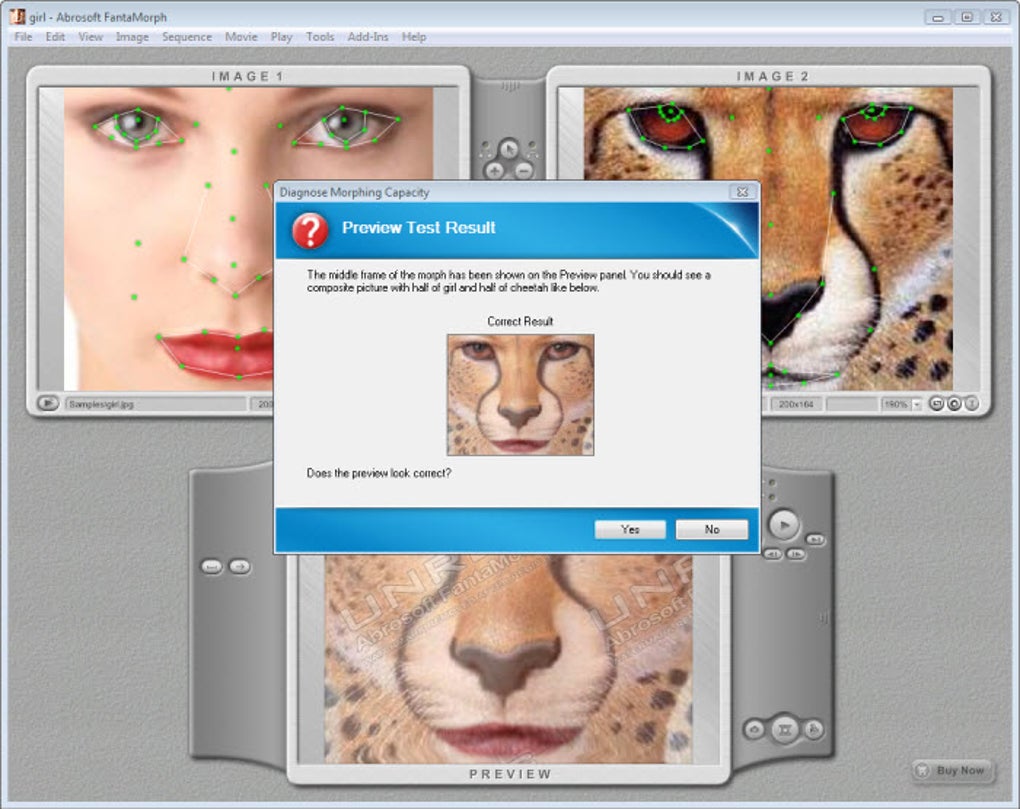
Abrosoft FantaMorph is a user‑friendly morphing tool that lets you turn two still images into a seamless, eye‑catching video transition. Whether you are a hobbyist photographer, a graphic designer, or a teacher looking for a visual effect to spice up a presentation, FantaMorph offers an intuitive wizard‑driven workflow that removes the steep learning curve typically associated with advanced animation software. After a quick diagnostic test, the program guides you step‑by‑step through placing “dots” on source and destination pictures, defining the path each feature will follow as the morph progresses.
The more dots you add, the finer the control and the more realistic the final animation becomes. In addition to classic morphing, FantaMorph supports warping (animation from a single image), background overlays, masks, music tracks, and a variety of transition effects. Finished projects can be exported as AVI, image sequences, web pages, or even screensavers.
Recent updates bring a new rendering engine, multi‑layer morphs, a face extractor, dual‑view mode for multi‑monitor setups, and a splittable workspace, making the software more powerful while retaining its signature ease of use. If you need a reliable, secure, and free‑to‑try solution for creating professional‑grade morphs, Abrosoft FantaMorph is worth a download.
Core Features, Pros & Cons
Feature Highlights
- Wizard‑driven morph creation – no steep learning curve.
- Dot‑based control for precise facial and object alignment.
- Dual‑view mode – perfect for dual‑monitor workstations.
- Multi‑layer morphs – run several morph sequences simultaneously.
- Improved rendering engine – sharper, clearer output.
- Face extractor, locator, and custom face model for rapid portrait morphs.
- Sequence list panel for easy re‑ordering, duplication, and linking.
- Camera tracks and key‑frame proportion control.
- Export options: AVI, image sequence, HTML5 web page, screensaver.
- Built‑in music, background, mask, and transition effects.
Pros
- Intuitive wizard makes morphing accessible to beginners.
- High‑quality output thanks to the new rendering engine.
- Flexible export formats cover most creative needs.
- Supports both Windows and macOS, with dual‑monitor capability.
- Free trial version lets you test before buying.
Cons
- Working area is fixed; zooming can feel cramped.
- Interface buttons are relatively small on high‑DPI displays.
- Advanced features (multi‑layer morphs, camera tracks) are only in the paid version.
- No native Linux support.
Installation, Setup & Compatibility
Step‑by‑Step Installation
- Visit the official Abrosoft website and click the “Download FantaMorph” button for your OS.
- Run the installer (FantaMorph_Setup.exe for Windows or .dmg for macOS) and follow the on‑screen prompts.
- Accept the license agreement, choose the installation folder, and let the wizard complete the copy process.
- After installation, launch the program; the first launch runs a quick “Morphing Capacity Diagnosis” to ensure your hardware can handle rendering.
- If the test passes, the main wizard appears, ready to guide you through your first project.
Getting Started with the Wizard
The wizard begins by asking you to import two images (or a single image for warping). Once loaded, you’ll see both pictures side by side. Use the “Add Dots” tool to click on key facial features—eyes, nose, mouth, chin—on the left image; the same dots will automatically appear on the right image.
Drag each dot to its corresponding location on the target picture. For finer control, enable the grid overlay or zoom in; the program’s “Snap to Grid” option helps maintain alignment. After placing all dots, move to the “Sequence” tab where you can set the duration, add motion blur (Trail effect), or insert a background music track.
The preview window updates in real time, allowing you to fine‑tune the animation before exporting.
Operating System Support
FantaMorph runs on Windows 7, 8, 10, and 11 (both 32‑bit and 64‑bit) as well as macOS 10.13 (High Sierra) and later. The installer automatically detects the appropriate version for your system. While there is no native Linux build, the software can be run on Linux via Wine, though some advanced features may not be fully supported.
Updating & Security
The program checks for updates each time it starts. When a new version is available, a non‑intrusive banner prompts you to download the installer. All updates are signed with a digital certificate to ensure authenticity and protect against tampering. The trial version is fully functional but adds a watermark to exported videos; purchasing a license removes the watermark and unlocks premium features.
FAQ & Final Thoughts
Can I use FantaMorph for commercial projects?
Yes. Once you purchase a license, you are free to use the exported videos and images in commercial work, including advertising, client presentations, and product demos.
What file formats can I export?
FantaMorph supports AVI, image sequences (PNG/JPEG), HTML5 web pages, and Windows screensavers (SCR). The paid version also adds MP4 export via an external encoder.
Is there a Mac‑only version?
No. The same installer works for both Windows and macOS. The application automatically detects the operating system and installs the appropriate binaries.
How many dots can I place per image?
There is no hard limit; however, performance may degrade if you exceed a few hundred dots per image, especially on older hardware. The new rendering engine handles higher dot counts more efficiently than previous versions.
Can I create a morph from a single picture?
Yes. The “Warp” mode lets you animate a single image by defining a start and end shape using the dot tool, creating a smooth transformation without a second source picture.
Conclusion – Should You Download Abrosoft FantaMorph?
Abrosoft FantaMorph strikes an impressive balance between accessibility and professional capability. Its wizard‑driven interface lowers the entry barrier for newcomers, while the advanced dot‑placement system, multi‑layer support, and new rendering engine satisfy power users looking for higher fidelity. The ability to export to multiple formats—including video, web page, and screensaver—makes it a versatile addition to any creative toolkit. Although the fixed workspace and small UI elements can feel restrictive on modern high‑resolution displays, these quirks are outweighed by the software’s core strengths. For anyone seeking a secure, free‑to‑try morphing solution that runs on both Windows and macOS, the answer is a clear “Download now.” Purchase the full license to unlock premium effects, remove watermarks, and enjoy continuous updates.
Pros: Easy wizard, high‑quality rendering, multi‑platform support, flexible export options.
Cons: Small UI elements, limited workspace, no native Linux version.
Ready to bring your photos to life? Download Abrosoft FantaMorph today and start creating stunning morphs in minutes!







